EC2 Cost Optimization: Are You Ready to Commit to Reserved Instances?

RI and Savings Plan utilization rates below 80% are far more common than teams admit. The dashboards show green, the discount applied, the finance team is happy — and meanwhile a chunk of every commitment is being paid for and not used.
Here's how it usually happens. You buy a 1-year EC2 Instance Savings Plan on m5.xlarge. All-upfront, that's roughly $1,075 for the year. Six months in, someone runs a Graviton benchmark, the numbers are great, and you migrate the fleet to m7g. That EC2 Instance Savings Plan was scoped to the m5 family. It doesn't follow you. You now pay for the m7g capacity on-demand and keep paying off the stranded m5 commitment. The "savings" turned into a double bill.
The mistake isn't buying Reserved Instances. RIs and Savings Plans are the single biggest lever on an EC2 bill — 30% to 70% off on-demand. The mistake is buying them before your architecture is stable enough to actually use them for the full term.
And the heuristic most teams use to decide is backwards. "We've been running this instance type for three months, let's commit." That's looking in the rear-view mirror. A commitment is a bet on the next 12 to 36 months, not the last three. The real question is: how likely is this workload to still look like this a year from now?
You can answer that with data you already have. There are four signals, each measurable from Cost Explorer or the AWS CLI, that together tell you whether you're ready to commit.
Four signals that tell you if you're ready
These are the four signals that combine into a single 0–100 risk score. The weights below aren't arbitrary — they reflect how much each one actually predicts a stranded commitment. You can compute every one of them yourself.
Signal 1 — Instance Family Churn (weight: 35%)
This is the heaviest signal, because a changing instance mix is the most common way commitments get stranded. It measures how much your top instance families shift month over month.
The method: pull Cost Explorer grouped by INSTANCE_TYPE_FAMILY at monthly granularity over the last 6 months. You can do exactly that from the CLI — set the dates to your own 6-month window:
aws ce get-cost-and-usage \
  --time-period Start=2026-01-01,End=2026-06-01 \
  --granularity MONTHLY \
  --metrics "UnblendedCost" \
  --group-by Type=DIMENSION,Key=INSTANCE_TYPE_FAMILY \
  --query "ResultsByTime[].Groups[].{Family:Keys[0],Cost:Metrics.UnblendedCost.Amount}" \
  --output table
For each month, take the top 5 families by spend. Then measure how different consecutive months are using Jaccard distance:
Jaccard distance = 1 − |intersection| / |union|A distance of 0 means the two months had identical top-5 families (no churn). A distance of 1 means they shared nothing (total churn).
Worked example. Say your top families this period are {m5, r5, c5, t3, r6i}, and a few months later, mid-Graviton-migration, they're {m7g, r7g, c7g, t4g, m5}. The only family in both sets is m5. So the intersection is {m5} (size 1) and the union is all 9 distinct families. That gives:
1 − 1/9 = 0.890.89 is very high churn. Your workload is structurally different than it was, and any family-specific commitment you bought before the migration is now mostly dead weight.
The score averages the Jaccard distance across each consecutive month-pair over the window.
Risk threshold: an average Jaccard distance above 0.3 over 6 months means your fleet is moving too fast for long-term, family-locked commitments. Graviton migrations, containerizing onto a different family, and ML-pipeline rebuilds all push this number up fast.
Signal 2 — Spend Trend Volatility (weight: 25%)
Churn tells you what you're running; volatility tells you how much. A workload can stay on the same families but swing wildly in size — and a commitment sized to a peak month is wasted in a trough month.
The metric is the coefficient of variation (CV) of your monthly EC2 spend over 6 months:
CV = (standard deviation / mean) × 100Worked example: six months averaging $4,200/month with a standard deviation of $1,260 gives a CV of 30%. That's a third of your spend bouncing around month to month — too much to safely commit to a fixed hourly floor.
Risk threshold: CV above 25% is too unpredictable to commit. (In the scoring model, CV is doubled and capped, so a 50% CV maxes out this signal at 100.)
One nuance worth internalizing: if your spend is volatile but you still want some commitment, Compute Savings Plans are far safer here than EC2 Instance Savings Plans. Compute SPs apply across families, sizes, regions, and even Fargate/Lambda, so a flexible commitment sized to your baseline survives the swings.
Signal 3 — Resource Lifecycle Duration (weight: 25%)
This one catches ephemeral fleets. If your individual instances live for days, not months, a 1-year commitment is the wrong instrument no matter how stable the aggregate spend looks.
The metric is the median number of days your individual EC2 instances stay alive — median, not mean, because a few long-lived bastion hosts will drag a mean upward and hide a fleet of short-lived workers. You can derive it from daily Cost Explorer data grouped by RESOURCE_ID, or sanity-check it directly against the live fleet with one CLI call:
aws ec2 describe-instances \
  --filters Name=instance-state-name,Values=running \
  --query "Reservations[].Instances[].{ID:InstanceId,Type:InstanceType,Launch:LaunchTime}" \
  --output table
Sort the output by Launch and eyeball the median age.
Risk threshold: a median instance lifetime under 30 days signals an ephemeral workload where RIs are the wrong tool. In the scoring model, a median of 30 days or less scores the maximum, and 180+ days scores zero, with a linear slide between.
Context: ECS on Spot, batch processing, ephemeral ML training jobs, and aggressive scale-in all produce short lifetimes. Steady-state app servers, databases, and background workers produce long ones — and those are exactly the resources that are safe to commit to.
Signal 4 — Existing Commitment Utilization (weight: 15%)
The lowest weight, but the most damning when it's bad — because it's direct evidence you're already wasting commitments. Before buying more, look at how well you're using what you have.
Check Cost Explorer → Savings Plans → Utilization Report, plus the RI Utilization Report. The score is simply the inverse of your average utilization: 100% utilized scores 0 (no waste), 0% utilized scores 100.
Risk threshold: existing utilization under 80% means fix this before buying anything new.
The trap here is subtle and worth stating plainly: buying more commitments does not fix low utilization — it buries the signal. New unused capacity drags the blended utilization number around and makes the underlying waste harder to see. If you're below 80%, the next purchase isn't optimization, it's compounding a mistake.
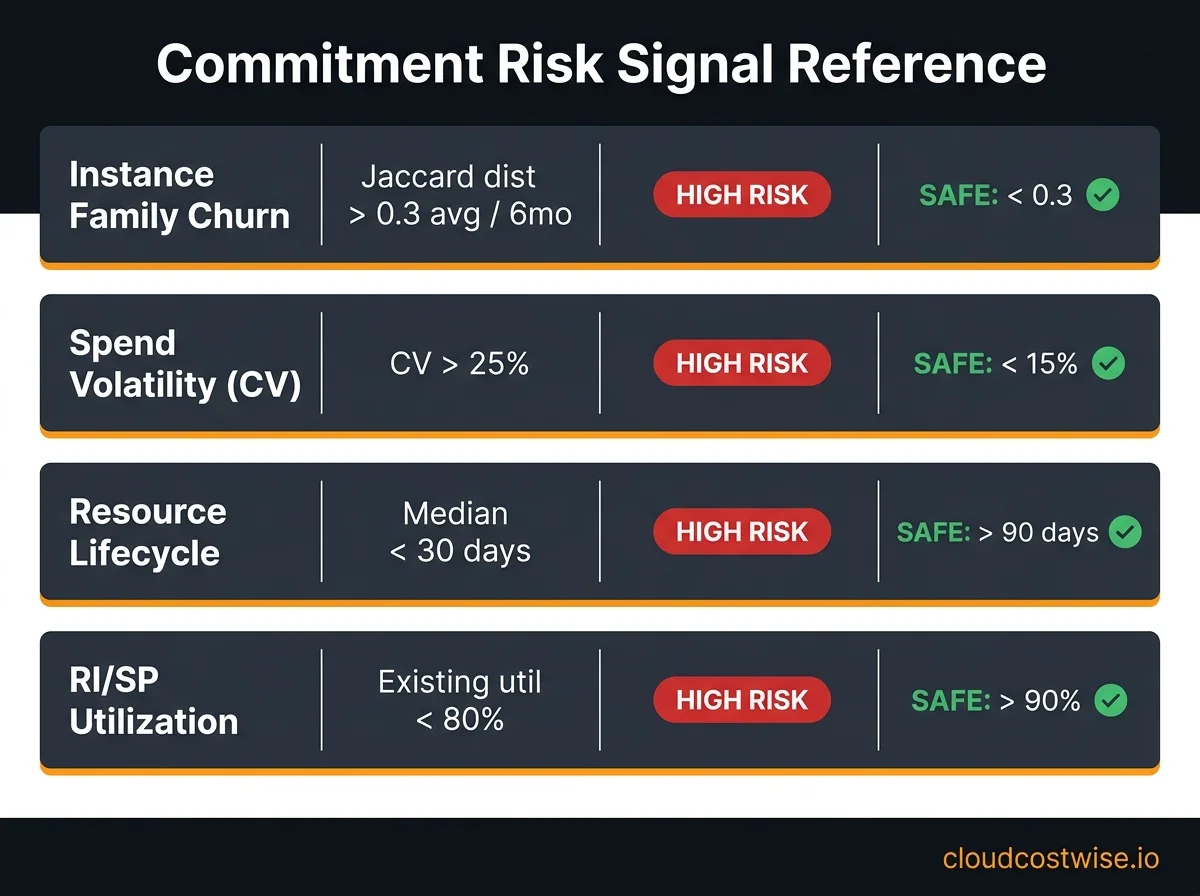
Mapping your score to a commitment decision
The four signals combine — weighted 35 / 25 / 25 / 15 — into a single 0–100 risk score. Here's how that score maps to an actual purchasing decision, mirroring the labels the model emits.
Low risk — stable architecture, churn < 0.3, CV < 15%, lifecycle > 90 days, utilization > 90%.
→ 3-year Convertible RIs or a 1-year Compute Savings Plan. This is the maximum-savings zone. Your architecture has earned the commitment; go take the discount.
Medium risk — some volatility, a Graviton migration partway done, moderate churn. → 1-year Compute Savings Plan only. Avoid EC2 Instance Savings Plans and standard RIs here — they're too specific for a fleet still in motion. A Compute SP applies to any instance family, size, and OS, which makes it the right instrument to capture savings on your stable baseline while the rest of the fleet shifts underneath it.
High risk — actively containerizing, churn > 0.6, short lifecycles, existing utilization under 70%.
→ On-demand plus Spot. No new commitments. Lean on Spot for fault-tolerant and interruptible workloads, and reserve any Compute SP strictly for the genuinely stable baseline portion of your compute, if there is one.
One clarification that trips people up: Convertible RIs can be exchanged for a different family, size, or region, so they're often pitched as "flexible." But the exchange is a manual process with real restrictions, and it's nowhere near as fluid as a Compute Savings Plan that just applies automatically. When in doubt mid-transition, the Compute SP is the safer flexible bet.
The 15-minute audit: check your account right now
You don't need a tool to get a first read. Here's the manual version of all four signals, end to end.
Step 1 — Churn. Cost Explorer → Group by Instance Type Family → Monthly granularity → last 6 months. Compare the top-5 families month over month. If the set is visibly reorganizing — new families entering, old ones dropping out — that's churn. Eyeball whether a typical month-to-month change shares fewer than ~3 of its top 5 families with the prior month (that's roughly the 0.3 distance line).
Step 2 — Volatility. Export your monthly EC2 totals for the same 6 months. Calculate the mean and standard deviation, then CV = std_dev / mean × 100. If CV is above 25%, flag it.
Step 3 — Lifecycle. Run the describe-instances command from Signal 3, sort by LaunchTime, and estimate the median instance age in days. Under 30 days is a red flag.
Step 4 — Utilization. Cost Explorer → Savings Plans → Utilization Report for the last 3 months. If you're under 80%, stop — understand why before you buy anything else.
Fifteen minutes of Cost Explorer and one CLI command will tell you more about your readiness to commit than any "we've been running this for a while" gut check.
Automated detection
If you'd rather have this calculated automatically than pull Cost Explorer data by hand every quarter, CloudWise computes a Commitment Risk Score as part of its RI/SP management view (shipped June 2, 2026). It combines the same four signals using the weights above and returns a 0–100 score, a label (LOW / MEDIUM / HIGH / CRITICAL), and a recommended maximum commitment term — so the buy/don't-buy decision comes with the math already done. You can find it at cloudcostwise.io.
The discount on a Reserved Instance is real, but it's only a discount if you use the whole term. Run the four signals first. If your architecture is stable, commit with confidence and take the savings. If it's moving, stay flexible — a Compute Savings Plan on your baseline, Spot for the rest — and revisit when the numbers settle. The worst outcome isn't paying on-demand a little longer. It's locking in a year of spend on a fleet you've already left behind.
Find this waste in your own account
Run the free scanner on your own machine. Read-only, no signup, and nothing is sent to CloudWise.
$ pip install cloudcostwise
What it checks · Prefer a dashboard? Start a free hosted scan (187 checks) →